Desktop Snapshot Functionality
How to Use Desktop Snapshots
The Snapshots feature provides a convenient way to back up your virtual machine and restore it when necessary.
For instance, if you are performing an upgrade that could break your system, you can stop the virtual machine and take a snapshot beforehand.
Should the upgrade succeed, the snapshot can be discarded; if not, you can revert the machine to its previous state.
Snapshots are supported on all DaDesktop machine types: Fresh Start, Trainer, Participant, and Standalone can all utilize snapshots.
Please note that restoring a snapshot will power down the machine, leaving it ready to be started again.
Taking a Snapshot

The steps below illustrate how to take a snapshot. Give the snapshot a clear descriptive name so you can remember when it was taken.

Below, two snapshots taken at different states are shown. You can restore or delete them as needed.

Automated Desktop Snapshots
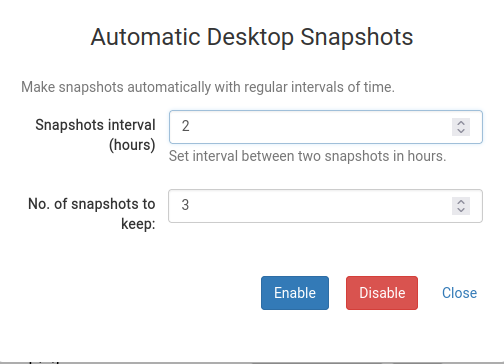
If you prefer snapshots to be taken automatically at regular intervals so you won't have to remember, Automated Desktop Snapshots is the ideal solution.
You can set both the number of snapshots to keep and the interval at which new ones are created.